

MCP servers are everywhere now. There are hundreds of them, and just as many clients connecting to them. Claude Code, VS Code, Cursor, terminal tools, custom apps. I built mcphost.link as a web-based MCP client myself.
Browsers as a native AI surface felt like the natural next step. That’s exactly what the WebMCP proposal is about — it introduces navigator.modelContext, a way for web pages to expose tools to browser AI agents. Chrome 146+ already has it behind a flag.
I wanted to see if existing MCP servers could plug into it without any changes on their end. So I built a bridge.
What It Does
WebMCP Bridge connects to a remote MCP server, discovers its tools, and re-registers them with Chrome’s WebMCP API.
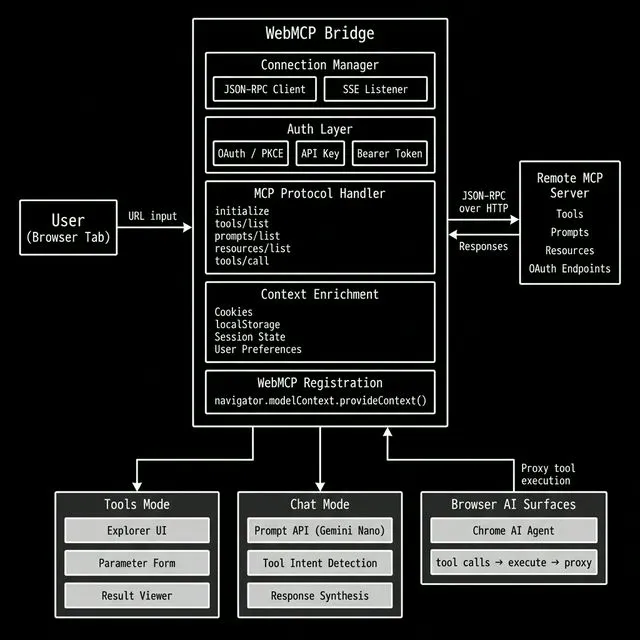
Demo
Let me walk you through the flow. You type in an MCP server URL, hit connect, and:
initializehandshake over JSON-RPC- Fetch
tools/list,prompts/list,resources/list - Render everything in a browsable UI
- Register each tool with
navigator.modelContext.provideContext() - Proxy tool calls back to the remote server
That’s it. No SDK. No framework. Just a web page that becomes an MCP client.
Here’s Where It Gets Interesting
navigator.modelContext.provideContext({
  tools: [{
    name: "search_proposals",
    description: "Search TC39 proposals",
    inputSchema: { type: "object", properties: {...} },
    execute: async (args) => {
      // enrich with page context before proxying
      const enriched = { ...args, user_locale: navigator.language };
      const result = await fetch(mcpServerUrl, {...});
      return { content: [{ type: "text", text: result }] };
    }
  }]
});
See that execute function? It’s a proxy, but it doesn’t have to be a dumb one.
The page has cookies, localStorage, session state, user preferences — first-party context that no external agent has access to. When the bridge proxies a tool call, it can enrich the request with what it knows about the user. A search query becomes a personalized search query. A checkout becomes a checkout with the saved address already attached.
Same applies to responses. The page can filter, redact, or augment what comes back from the MCP server before surfacing it to the browser AI. The server returns raw data; the page decides what the agent actually sees.
The browser isn’t a passthrough. It’s a context layer.
Two Modes
Tools mode is a test bench. Connect to a server, pick a tool, fill in parameters, hit execute. Good for debugging and exploring what an MCP server exposes.
Chat mode uses the Prompt API (window.LanguageModel) for on-device inference. The local model figures out which tools to call based on your question, calls them through the bridge, and feeds the result back into the conversation.
Trade-off: the on-device model needs to download first. Chat stays locked until it’s ready. Download progress can be sparse — 0% might persist even when it’s actively downloading. Once ready, chat unlocks automatically.
Auth
MCP servers behind auth are handled:
- OAuth — Discovers
/.well-known/oauth-authorization-server, runs PKCE auth code flow, supports dynamic client registration - Manual — API key, basic auth, bearer token for quick testing
- Skip — Public servers need nothing
OAuth in the browser depends on the server’s endpoints being CORS-friendly. If they’re not, direct browser calls will fail.
No Framework
The whole thing is vanilla HTML, CSS, and JS. No React. No Vite. No build step.
index.html      → app shell
styles.css      → styles
app.js          → init()
js/core/        → shared state
js/auth/        → auth client + UI
js/mcp/         → parser, connection, execution, WebMCP
js/ui/          → rendering
js/chat/        → chat flow + tool intent
js/utils/       → helpers
27 JS files concatenated into a single bundle.html for deployment. That’s the build system.
Why the Browser Matters
Why put a web page in the middle when the agent could call the MCP server directly?
Because the page can do things a direct connection can’t.
Context enrichment. The page has cookies, localStorage, session state, user preferences. When the bridge proxies a tool call, it can inject first-party context the MCP server doesn’t have. A search query becomes a personalized search query. A checkout comes with the saved address already attached.
Response transformation. The page can filter, redact, or augment what comes back before the agent sees it. Strip sensitive fields. Merge with local data. Reformat for the current UI. The MCP server returns raw data; the page decides what the agent actually sees.
Multi-server composition. Connect to 5 different MCP servers and present them as one unified tool surface. The agent doesn’t know or care that “search” comes from server A and “checkout” from server B. The page is the aggregator.
Page-local tools. The bridge can register tools that don’t proxy to any MCP server at all — they just operate on the page. Read the DOM, fill a form, screenshot a section, access the clipboard. Mix remote MCP tools with local browser capabilities in one tool surface.
Consent gates. Before proxying a sensitive tool call — create_order, send_email — the page can pop a confirmation dialog. The user approves or rejects. The agent can’t bypass it because the execute function is under the page’s control.
Rate limiting and caching. The page can throttle tool calls, cache repeated results, batch requests. If the agent calls search_products 10 times with the same query, the page returns the cached result after the first call. The MCP server never sees the duplicates.
Progressive disclosure. Register a small set of tools initially. Based on conversation state or user auth, dynamically register more. The agent starts with search and browse. Only after the user logs in does checkout appear.
Audit logging. Every tool call flows through the page’s JS. Log every request, response, timestamp to localStorage, IndexedDB, or a remote endpoint. Full observability of what the agent did and when.
The browser isn’t a passthrough. It’s a context layer.
Browser Requirements
- Chrome 146+ with
chrome://flags/#enable-webmcp-testing - Prompt API for chat mode: enable
chrome://flags/#optimization-guide-on-device-modelandchrome://flags/#prompt-api-for-gemini-nano, then trigger model download atchrome://components→ “Optimization Guide On Device Model” - Without WebMCP, it still works as an MCP explorer
- Remote servers must allow your origin via CORS
Right now this is Chrome-only. Hoping to see more browsers adopt WebMCP — the web is better when these capabilities aren’t locked to a single engine.
Try It
Live: h3manth.com/ai/webmcp
Source: github.com/hemanth/webmcp-bridge
Open DevTools when you connect — the console logs the full MCP protocol flow. Good way to learn how the pieces fit.
Let me know if you end up building something with it.

About Hemanth HM
Hemanth HM is a Sr. Machine Learning Manager at PayPal, Google Developer Expert, TC39 delegate, FOSS advocate, and community leader with a passion for programming, AI, and open-source contributions.