Aproba

aproba

A ridiculously light-weight function argument validator

aproba is of a kind an argument validator, that is concise and easier to use than assertions and doesn't encourage an infinite bikeshed of DSLs.

Get it: npm install aproba

Sample usage:

1
2
3
4
5
6
7
8
9
10
const validate = require("aproba")

const myfunc = (...args) {
  validate('SNF', args)
}

myfunc('test', 23, function () {}) // ok
myfunc(123, 23, function () {}) // type error
myfunc('test', 23) // missing arg error
myfunc('test', 23, function () {}, true) // too many args error

Valid types are:

type description
* matches any type
A Array.isArray OR an arguments object
S typeof == string
N typeof == number
F typeof == function
O typeof == object and not type A and not type E
B typeof == boolean
E instanceof Error OR null (special: see below)
Z == null

Validation failures throw one of the following code errors:

  • EMISSINGARG
  • EINVALIDTYPE
  • ETOOMANYARGS
  • EUNKNOWNTYPE (for an invalid type)

P.S: For optinal args one can use a | ex: SO|S.

GIF FTW!

aproba.gif

Pretty-error

pretty-errror

errors with less clutter

pretty-error turns error objects into something similar to an html document, and then uses RenderKid to render the document using simple html/css-like commands.

Get it: npm install pretty-error

Sample usage:

1
2
3
4
5
const PrettyError = require('pretty-error');
const pe = new PrettyError();

const renderedError = pe.render(new Error('Some error message'));
console.log(renderedError);
1
2
3
4
5
try {
   doSomethingThatThrowsAnError();
} catch (error) {
   console.log(pe.render(error));
}

GIF FTW!

pretty-error

Hiper

hiper

🚀 A statistical analysis tool for performance testing.

hiper is short for Hi performance, makes use of puppeteer and gives us the below performance metrics.

  • DNS lookup time
  • TCP connect time
  • TTFB
  • Download time of the page
  • After DOM Ready download time
  • White screen time
  • DOM Ready time
  • Load time

Get it: npm install hiper

Sample usage:

1
2
3
4
5
6
7
8
9
10
11
12
13
14
15
16
17
18
hiper --help

Usage: hiper [options] [url]

🚀 A statistical analysis tool for performance testing

Options:

   -v, --version                output the version number
   -n, --count <n>              specified loading times (default: 20)
   -c, --config <path>          load the configuration file
   -u, --useragent <ua>         to set the useragent
   -H, --headless [b]           whether to use headless mode (default: true)
   -e, --executablePath <path>  use the specified chrome browser
   --no-cache                   disable cache (default: false)
   --no-javascript              disable javascript (default: false)
   --no-online                  disable network (defalut: false)
   -h, --help                   output usage information
1
2
3
4
5
6
7
8
9
10
11
12
13
14
15
16
17
18
19
20
21
22
$ hiper nmotw.in


  _   _ _
 * * * (_)_ __   ___ _ __
 * |_* * * '_ \ / _ \ '__|
 *  _  * * |_) *  __/ |
 |_* |_|_* .__/ \___|_|
         |_|


🚀 It takes 1.669 s to load `https://nmotw.in` 20 times


  DNS lookup time                 1.00 ms
  TCP connect time                126.00 ms
  TTFB                            551.00 ms
  Download time of the page       7.00 ms
  After DOM Ready download time   558.00 ms
  White screen time               699.00 ms
  DOM Ready time                  936.00 ms
  Load time                       1.26 s

GIF FTW!

hiper

Time-stamp

time-stamp

Get a formatted timestamp.

How many times have you created time stamp in your code base?

time-stamp makes it easy to create them, this module revovles around the R.E -> /(?=(YYYY|YY|MM|DD|HH|mm|ss|ms))\1([:\/]*)/;

Supported formats:

1
2
3
4
5
6
7
YYYY: full year (ex: 2018)
MM: month (ex: 04)
DD: day (ex: 01)
HH: hours (ex: 12)
mm: minutes (ex: 59)
ss: seconds (ex: 09)
ms: milliseconds (ex: 532)

Sample usage:

1
2
3
4
5
6
7
8
9
10
11
12
13
14
15
16
17
18
19
20
21
22
23
24
25
26
27
28
29
30
31
32
33
34
35
36
37
38
39
40
41
42
43
44
45
46
const timeStamp = require("time-stamp");

timestamp();
//=> 2018-07-23

timestamp('YYYYMMDD');
//=> 20180723

timestamp('YYYYMMDD:ss');
//=> 20180723:10

timestamp('YYYY/MM/DD:mm:ss');
//=> 2018/07/23:30:10

timestamp('YYYY:MM:DD');
//=> 2018:07:23

timestamp('[YYYY:MM:DD]');
//=> [2018:07:23]

timestamp('YYYY/MM/DD');
//=> 2018/07/23

timestamp('YYYY:MM');
//=> 2018:07

timestamp('YYYY');
//=> 2018

timestamp('MM');
//=> 07

timestamp('DD');
//=> 23

timestamp('HH');
//=> 21

timestamp('mm');
//=> 30

timestamp('ss');
//=> 10

timestamp('ms');
//=> 365

GIF FTW

time-stamp

Proxymise

proxymise

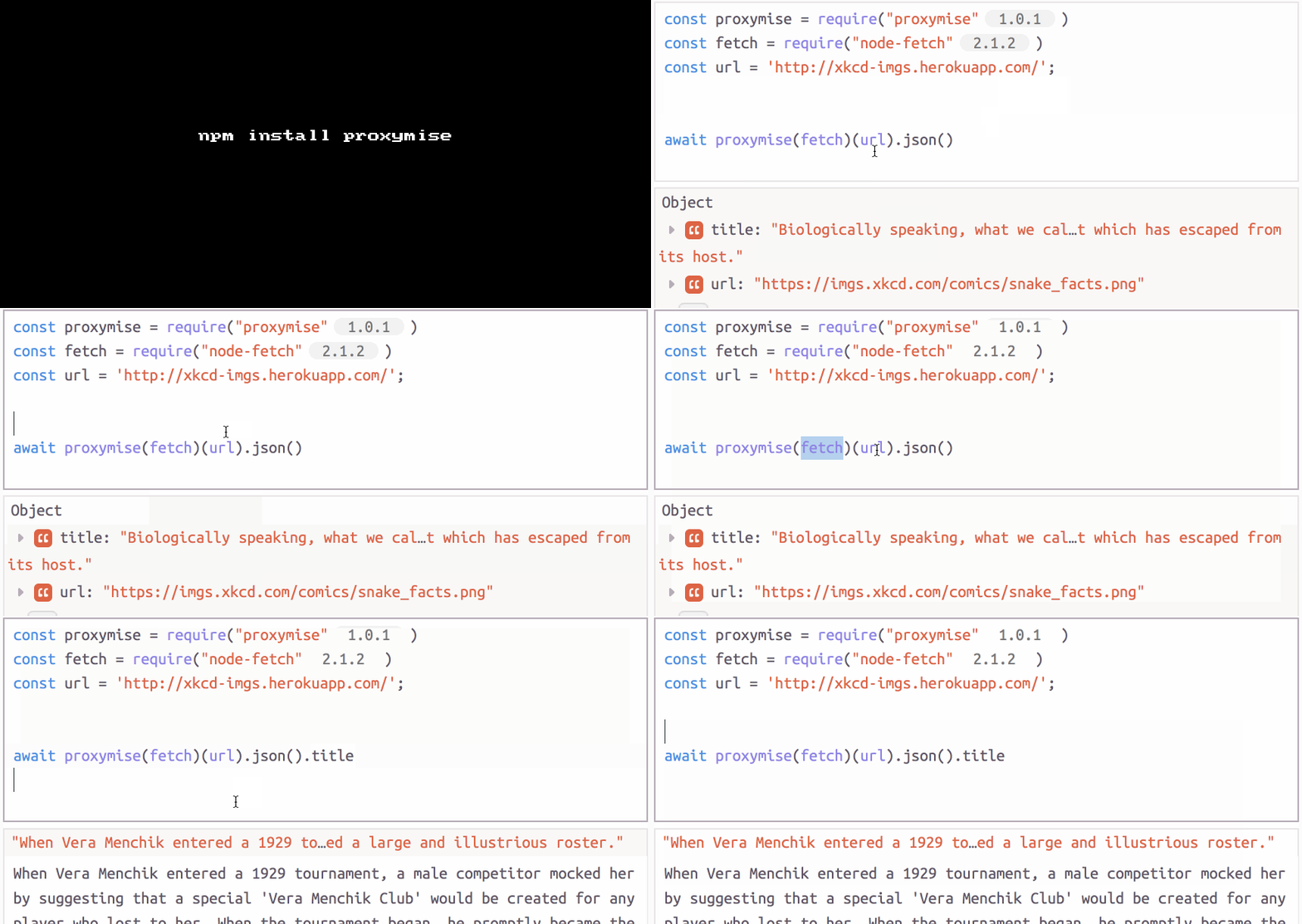
Chainable Promise Proxy.

proxymise makes cheeky use of Proxy API and provides a high dose of syntax sugar in chaining promises.

Get it: npm install proxymise

Sample usage:

1
const proxymise = require('proxymise');
1
2
3
4
5
// Instead of thens
foo.then(value => value.bar())
  .then(value => value.baz())
  .then(value => value.qux)
  .then(value => console.log(value));
1
2
3
4
5
6
// Instead of awaits
const value1 = await foo;
const value2 = await value1.bar();
const value3 = await value2.baz();
const value4 = await value3.qux;
console.log(value4);
1
2
3
// Use proxymise
const value = await proxymise(foo).bar().baz().qux;
console.log(value);

GIF FTW

proxymise

Auto-parse

auto-parse

auto-parse any value you happen to send in.

auto-parse any value you happen to send in like: String, Number, Boolean, Array, Object, Function, undefined and null and it shall get parsed to the appropriate value.

GET IT: npm install auto-parse

Sample usage:

1
2
3
4
5
6
7
8
9
10
11
12
const autoParse = require("auto-parse")

autoParse([
  '1', 'TrUe', ' undefined ',
  ' null ', '[]', {age : "50"}
]);

/*

[1, true, undefined, null, [], {age: 50} ]

*/
1
2
3
4
5
6
// Set Type
autoParse(1, 'Boolean')  =>  true
autoParse(0, 'Number')  =>   0
autoParse(1, Boolean)  =>  true
autoParse(0, Number)  =>   0
autoParse(1234, String)  =>  '1234'
1
2
3
// dates
autoParse('1989-11-30', 'date')  =>  Thu Nov 30 1989 18:00:00 GMT-0600 (CST)
autoParse('1989-11-30', Date)  =>  Thu Nov 30 1989 18:00:00 GMT-0600 (CST)
1
2
3
4
5
// Passing Functions to type
function Color (inputColor) {
  this.color = inputColor
}
autoParse('#AAA', Color)  =>  {color: '#AAA'}

GIF FTW!

auto-parse

Error-stack-parser

error-stack-parser

Simple, cross-browser Error parser.

error-stack-parser library parses and extracts function names, URLs, line numbers, and column numbers from the given Error's stack as an Array of StackFrames.

Get it: npm install error-stack-parser

Sample usage:

1
2
3
4
5
6
7
8
9
10
11
12
13
14
15
16
17
18
19
20
21
22
23
24
const ErrorStackParser = rquire("error-stack-parser);

ErrorStackParser.parse(new Error('BOOM'));

/*
=> [
        StackFrame({functionName: 'foo', args: [], fileName: 'path/to/file.js', lineNumber: 35, columnNumber: 79, isNative: false, isEval: false}),
        StackFrame({functionName: 'Bar', fileName: 'https://cdn.somewherefast.com/utils.min.js', lineNumber: 1, columnNumber: 832, isNative: false, isEval: false, isConstructor: true}),
        StackFrame(... and so on ...)
   ]
*/

Object.keys(ErrorStackParer);

/*
[ 'parse',
  'extractLocation',
  'parseV8OrIE',
  'parseFFOrSafari',
  'parseOpera',
  'parseOpera9',
  'parseOpera10',
  'parseOpera11' ]
*/

GIF FTW!

error-stack-parser

Ent

ent

Encode and decode HTML entities.

ent helps in encoding and ecoding HTML entities.

Get it: npm install ent

Sample usage:

1
2
3
const ent = require('ent');
console.log(ent.encode('<span>©moo</span>'))
console.log(ent.decode('&pi; &amp; &rho;'));
1
2
&#60;span&#62;&#169;moo&#60;/span&#62;
π & ρ
1
2
3
4
5
6
7
const ent = require('ent');

const encode = require('ent/encode');
// ^ Escape unsafe characters in str with html entities.

const decode = require('ent/decode');
// ^ Convert html entities in str back to raw text.

GIF FTW!

ent

Media-typer

media-typer

RFC 6838 media type parser.

media-typer helps in parsing and formatting media type.

Get it: npm install media-typer

Sample usage:

1
2
3
4
5
6
7
8
9
10
11
12
13
14
15
const typer = require('media-typer');

typer.parse('image/svg+xml; charset=utf-8');

/*
{ type: 'image',
  subtype: 'svg',
  suffix: 'xml',
  parameters: { charset: 'utf-8' } 
}
*/

typer.format({type: 'image', subtype: 'svg', suffix: 'xml'})

// ^ 'image/svg+xml'
1
2
3
4
typer.parse(req);

/* ^ Parse the `content-type` header from the given req.
 Short-cut for typer.parse(req.headers['content-type'])*/

GIF FTW!

media-typer

Qw

qw

Quoted word literals!

qw use template strings to bring over this little common convenience from Perl-land.

Get it: npm install qw

_Sample usage:

1
2
3
4
5
6
7
8
9
10
11
12
13
14
const qw = require("qw")

qw `
this
shall
break
into
an array`

// ^ ["this", "shall", "break", "into", "an", "array"]

qw `also xpression: ${40+2}`

// ^ ["also", "expression:", 42]

GIT FTW!

qw.gif