Scroll-into-view-if-needed

scroll-init-view-if-needed

Element.scrollIntoView ponyfills for things like "if-needed" and "smooth".

scroll-into-view-if-needed

This is a ponyfill for Element.scrollIntoViewIfNeeded. Since then the CSS working group have decided to implement its features in Element.scrollIntoView as the option scrollMode: "if-needed". Thus this library got rewritten to implement that spec instead of the soon to be deprecated one.

Don't miss the Demo.

Get it: npm install scroll-into-view-if-needed

Usage:

1
2
3
4
5
6
7
8
9
10
11
12
13
14
15
16
// es6 import
import scrollIntoView from 'scroll-into-view-if-needed';

const node = document.getElementById('hero');

scrollIntoView(node, {
  scrollMode: 'if-needed',
  block: 'nearest',
  inline: 'nearest',
})

scrollIntoView(node, { block: 'center', inline: 'center' });
// scrollMode is "always" by default

// smooth scroll if the browser supports it and if the element isn't visible
scrollIntoView(node, { behavior: 'smooth', scrollMode: 'if-needed' });

GIF FTW!

scroll-into-view-if-needed

Abort-controller

abort-controller

An implementation of WHATWG AbortController interface.

The AbortController interface allows us to abort one or more DOM requests as per the need.

From the sepc:

The AbortController() constructor, when invoked, must run these steps:

  • Let signal be a new AbortSignal object.

  • Let controller be a new AbortController object whose signal is signal.

  • Return controller.

The signal attribute’s getter, when invoked, must return the context object’s signal.

The abort() method, when invoked, must signal abort on the context object’s signal.

Get it: npm install abort-controller

Usage:

1
2
3
4
5
6
import AbortController from "abort-controller";
// or
const AbortController = require("abort-controller");

// or UMD version defines a global variable:
const AbortController = window.AbortControllerShim;
1
2
3
4
5
6
7
8
9
10
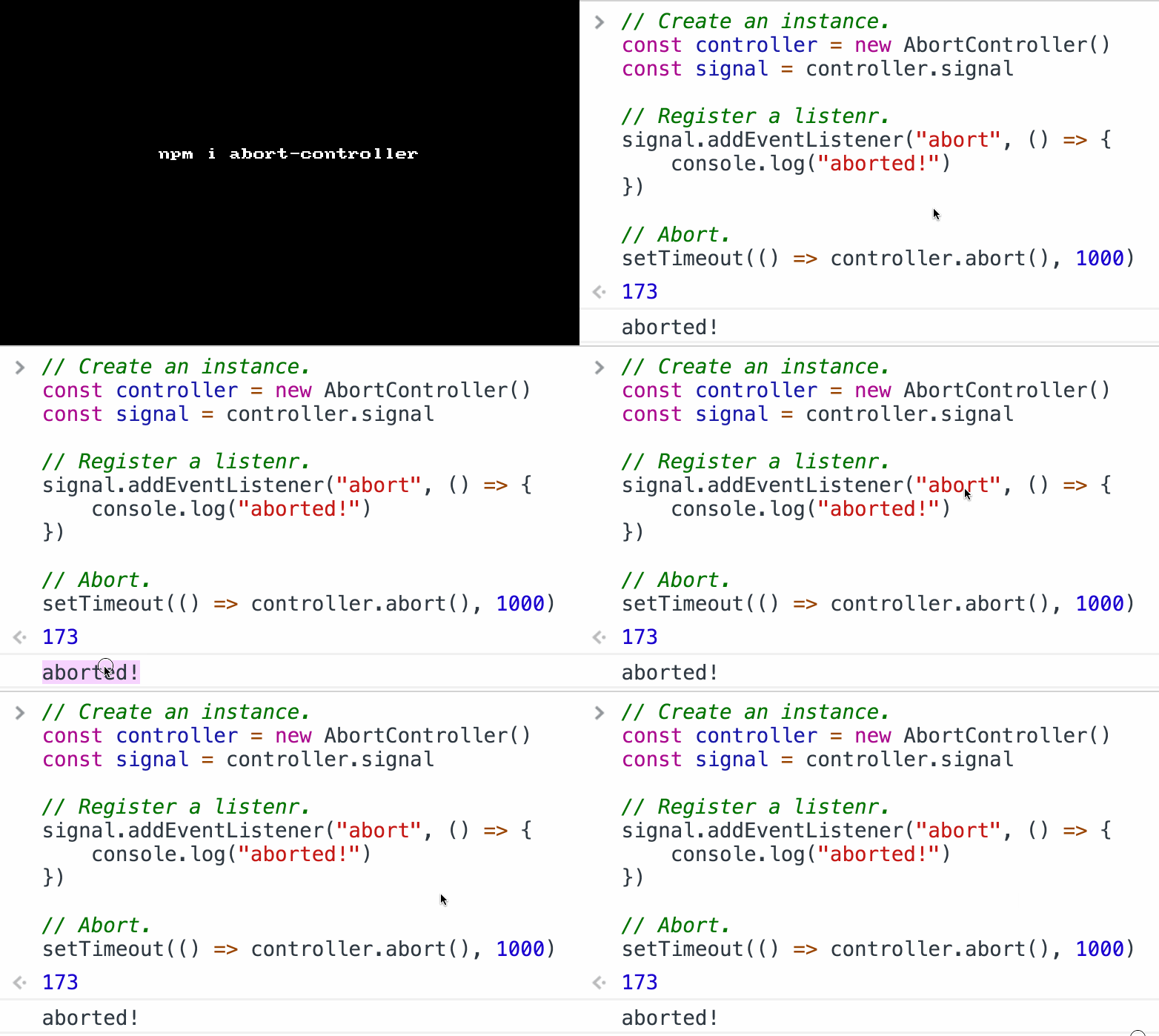
import AbortController from "abort-controller";

const controller = new AbortController();
const signal = controller.signal;

signal.addEventListener("abort", () => {
    console.log("aborted!");
})

controller.abort();

GIF FTW!

abort-controller

Package-size

package-size

Get the bundle size of an npm packages.

package-size is a sweet CLI util, that gives us info about the bundle size of npm packages.

What it does?

  • Install the packages to a temp directory.
  • Bundle the packages with webpack and get the bundle size.
  • Show you the bundle size and cache it by package version.

Get it: npm install -g package-size

Sample usage:

1
2
3
4
5
6
7
8
9
10
11
12
13
14
15
16
17
18
19
20
21
22
23
24
25
26
27
28
# get the size of vue bundle
package-size vue

# get the size of react+react-dom bundle
package-size react,react-dom

# get the size of vue react+react-dom preact bundles
package-size vue react,react-dom preact

# get the size of react+react-dom without using the cache
package-size react,react-dom --no-cache

# get the size of file in current working directory
package-size ./dist/index.js
# or a package in current working directory, explictly using `--cwd` flag
package-size vue --cwd

# or event multiple versions for the same package!
package-size [email protected] [email protected] react@15

# save results to file system in JSON format
# defaults to ./package-size-output.json
package-size cherow --output
# or custom path
package-size cherow --output stats.json

# analyze bundle with webpack-bundle-analyzer
package-size cherow --analyze
1
2
3
4
5
6
7
8
9
10
11
12
13
14
const getSizes = require('package-size')

getSizes('react,react-dom', options)
  .then(data => {
    console.log(data)
    //=>
    {
      name: 'react,react-dom',
      size: 12023, // in bytes
      minified: 2342,
      gzipped: 534,
      versionedName: '[email protected],[email protected]'
    }
  })

GIF FTW!

Soted-object

sorted-object

sort object by keys.

sorted-object is an uber tiny module that helps us sort an object by it's keys.

P.S: It got a 232,037 downloads last week ;)

Get it: npm install sorted-object

Sample usage:

1
2
3
4
const sortedObject = require('sorted-object')

sortedObject({b:1,c:2,a:3,0:0})
// => { '0': 0, a: 3, b: 1, c: 2 }

GIF FTW!

sorted-object

To-regex

to-regex

Generate a regex from a string or array of strings.

to-regex is tiny module that helps us to easily create R.E from a string or an array of strings.

Get it: npm install to-regex

Sample usage:

1
2
3
4
5
6
7
8
9
10
11
12
13
14
15
16
const toRegex = require('to-regex');

console.log(toRegex('foo'));
//=> /^(?:foo)$/

console.log(toRegex('foo', {negate: true}));
//=> /^(?:(?:(?!^(?:foo)$).)*)$/

console.log(toRegex('foo', {contains: true}));
//=> /(?:foo)/

console.log(toRegex(['foo', 'bar'], {negate: true}));
//=> /^(?:(?:(?!^(?:(?:foo)|(?:bar))$).)*)$/

console.log(toRegex(['foo', 'bar'], {negate: true, contains: true}));
//=> /^(?:(?:(?!(?:(?:foo)|(?:bar))).)*)$/

GIF FTW!

to-regex

Lazy-property

lazy-property

Add a lazily initialized property to an object.

lazy-propert play well with Object.defineProperty to provide laziness over object's properties.

Get it: npm install lazy-property

Sample usage:

1
require("lazy-property")(obj, name, init[, enumerable])

^ Adds a lazily initialized property to the object.

  • obj is the object to add the property to
  • name is the name of the property
  • init is a function that computes the value of the property
  • enumerable if the property is enumerable (default false)
1
2
3
4
5
6
7
8
9
10
11
12
13
14
15
16
17
18
19
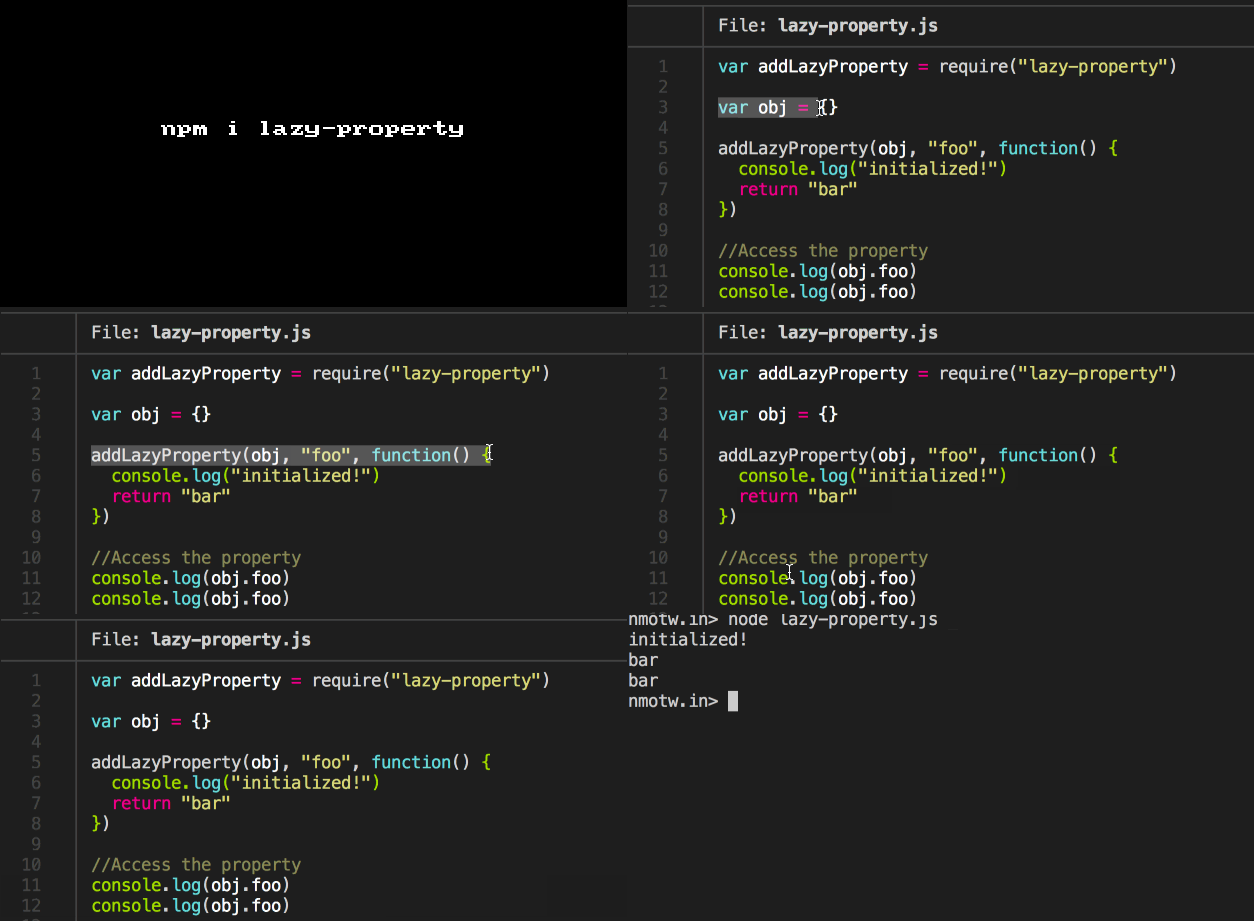
var addLazyProperty = require("lazy-property")

var obj = {}

addLazyProperty(obj, "foo", function() {
  console.log("initialized!")
  return "bar"
})

//Access the property
console.log(obj.foo)

//Prints out:
//
//    initialized!
//    bar
//    bar
//

GIF FTW!

lazy-property

Clockmoji

clockmoji

🕗 Get an emoji clock based on the time.

clockmoji is fun little module for representation of the current time in emoji.

It calculates the short hard, long hard for the clock and fetch the required emoji's unicode.

1
2
3
4
  var date = new Date(date.getTime() + 15 * 60000)
  var shortHand = date.getHours() % 12
  var min = date.getMinutes()
  var longHand = (min - (min % 30)) / 30 ? '30' : '00'

Get it: npm install clockmoji

Sample usage:

1
2
3
4
5
6
7
8
9
10
11
12
13
14
15
16
17
18
19
20
21
22
23
24
25
26
27
28
29
30
date
Tue May 26 18:19:10 CDT 2015

# no arguments will return the current time
clockmoji
🕡

# Pass a time in the format mm:ss
clockmoji 10:00
🕙

# Military time supported
clockmoji 14:00
🕑

# any arbitrary time works -- rounds down if its less than :15
clockmoji 12:04
🕛

# rounds up if the minutes are :15
clockmoji 12:24
🕧

# supports piping
echo 6:30 | clockmoji
🕡

# invalid time returns ⚠
clockmoji 9999
⚠
1
2
3
4
5
const clockmoji = require('clockmoji')

console.log(clockmoji())
console.log(clockmoji('12:00'))
console.log(clockmoji('18:30'))

GIF FTW!

clockmoji

Meant

meant

Best Similarity, like "did you mean".

meant uses levenshteinD and provides a Did you mean? like feature.

Get it: npm install meant

Sample usage:

1
2
3
4
const meant = require('meant');

meant('lk', ['ll', 'ls', 'ts'])
// => [ 'll', 'ls' ]

GIF FTW!

meant

Caseless

caseless

caseless semantic get/set/check for headers.

caseless helps to get/set/check specially for headers in a caseless manner while also preserving the caseing of headers the first time they are set.

Get it: npm install caseless

Sample usage:

1
2
3
4
5
6
7
8
9
10
11
12
13
14
15
16
17
18
19
20
21
22
23
24
25
26
27
28
const c = require('caseless');
let headers = {
    'a-header': 'asdf',
    'Content-Length': 1000
   }
  , c = caseless(headers)
  ;

// Get set
c.set('a-Header', 'asdf');
c.get('a-header') === 'asdf';

// has check
c.has('a-header') === 'a-Header';

// set values
c.set('a-Header', 'fdas')
c.set('a-HEADER', 'more', false)
c.get('a-header') === 'fdsa,more'

// del
c.del('Content-length');

// swap
c.set('a-Header', 'fdas')
c.swap('a-HEADER')
c.has('a-header') === 'a-HEADER'
// headers === {'a-HEADER': 'fdas'}

GIF FTW!

caseless

Gauge

gauge

Terminal based horizontal gauge.

gauge is a terminal based horizontal gauge / progress bar which provides the user the totally control on the progess indication, plusation or hiding the porgress bar. It has provides a convenient theming option.

Get it: npm install gauge

Sample usage:

1
2
3
4
5
6
7
8
const Gauge = require('gauge');
const gauge = new Gauge();

gauge.show("test", 0.20);

gauge.pulse("this");

gauge.hide();

GIF FTW!

gauge